
How do I find apartments with online applications on RentCafe?
Summary
To find apartments you can apply for online on RentCafe, start a search and open the “Filters” section, then select the “Online application” option. This will show listings that allow you to start the application process online. You can also use Ren — your apartment search assistant on RentCafe, formerly known as AI mode — to find apartments with online applications by describing what you’re looking for in a conversation.
This guide explains how to search for apartments you can apply for online.
How do I use the “Online application” filter?
1. Start your search
Go to www.rentcafe.com or open the RentCafe mobile app and search for apartments using:
- A city or ZIP code
- A neighborhood
- A phrase like “apartments in Austin under $2000, pet-friendly”
Once you submit your search, RentCafe will display matching listings in that area.
2. Open the Filters section
Once results load, open the Filters panel.
- On desktop: use the filters panel on the results page
- On mobile: tap the filter icon (sliders) at the top of the screen
From there, you can choose filters based on what matters most to you.
3. Select “Online application”
Look for the “Online application” option among the available filters. Select it to show properties that allow you to begin the application process online through RentCafe.

4. Apply filters and review results
Apply your filters to update the listings. Your results will now show apartments where online applications are available. You can continue refining your search with other filters, such as:
- Price
- Bedrooms
- Amenities
- Move-in date
- Pet-friendly options
For more details about using filters to narrow down your search, check out our guide: How do you filter apartment listings on RentCafe.com?
Once you find a listing you like, open the property page and look for the “Apply now” button.
Can I find apartments with online applications using Ren?
Yes. You can also use Ren, our apartment search assistant, to look for apartments that offer online applications, all without needing a RentCafe account.
Ren lets you describe what you want in everyday language, including whether you want to apply online, and guides you to matching apartments through a two-way conversation.
How do I search for apartments with online applications using Ren?
1. Start a search and open Ren
Search for apartments in a specific city as usual, then click or tap “Ask Ren” at the top of the results page.
Your existing search details, such as location and filters, carry over automatically, so Ren picks up where you left off.
2. Ask for apartments with online applications
Inside the chat with Ren, type a request such as:
- “Apartments in Austin with online applications”
- “Show me apartments I can apply for online under $2,000”
Ren will use your request to refine your results and may ask follow-up questions to better understand what you’re looking for.
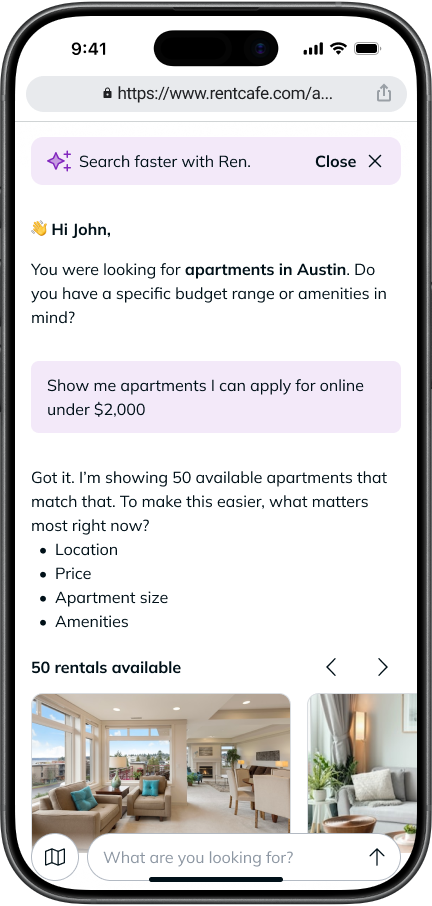
3. Refine your results
Ren recognizes that you’re looking for apartments with online applications and updates your results in real time as you chat.
You can continue refining your search by adding more details, such as:
- Budget
- Bedrooms
- Amenities
- Neighborhood
- Move-in timing
For example, you could ask for “1-bedroom apartments in Chicago with online applications and parking.”
What should I do if I don’t see many results?
If few or no listings appear, try adjusting your search.
You can:
- Expand your search area
- Remove one or two extra filters
- Increase your budget range
- Search by city instead of a specific neighborhood
- Check the property page to see if other contact options are available
If you’re searching with Ren and your request returns few or no results, Ren will suggest adjustments — like revising your budget or considering a nearby neighborhood — so you can keep exploring without starting over.
Not every property may offer online applications through RentCafe. Some properties may ask you to contact the leasing office before applying.
Once you’ve found your dream apartment, check out our step-by-step guide on how to apply online: How to apply for an apartment on RentCafe.com .
FAQ
A: “Online application” means the property allows you to begin the rental application process online through RentCafe.
A: In many cases, you can complete the application online. However, some properties may still require additional steps, documents, payments, or follow-up from the leasing office.
A: This may happen if no properties in your search area currently offer online applications; your filters are too specific; or online applications are not enabled for those listings. Try adjusting your filters or expanding your search location.
A: Yes. If you don’t see an online application option, you can still open the property listing and use the available contact options, such as calling the leasing office or sending a message.
A: Yes, you need a RentCafe applicant account to start, save, submit, or track an online application.