
How do I find apartments faster using Ren on RentCafe?
Summary
Ren is your apartment search assistant on RentCafe, formerly known as AI mode. Instead of relying on filters alone, you describe what you’re looking for in your own words, and Ren guides you to the right match through a two-way conversation: acknowledging your preferences, asking follow-up questions, suggesting neighborhoods and refining your results in real time.
Every property, price and amenity Ren recommends comes from active RentCafe listings; nothing is made up.
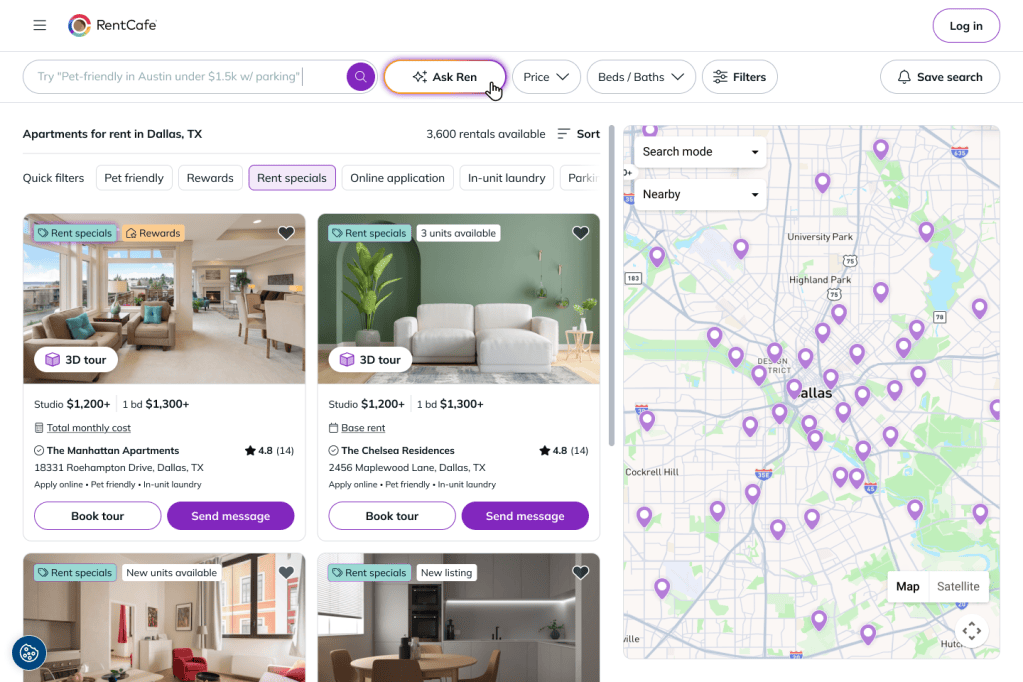
To find apartments using Ren, start a search as usual, then select Ask Ren on the results page.
What is Ren on RentCafe?
Ren is a built-in AI apartment search assistant on RentCafe, available for every location nationwide. Instead of starting with filters, you describe what matters to you in everyday language — for example, “a two-bedroom under $2,000 in Minneapolis near light rail” — and Ren surfaces matching listings and asks focused follow-up questions. It keeps track of your criteria as you go, so you can refine your preferences without rebuilding your search.
With Ren, you can:
- Describe your search in your own words — location, budget, bedrooms, amenities
- Search near a campus, transit station, workplace or other named place
- Change preferences mid-conversation without starting over
- Ask about pet policies, square footage, rent specials and resident reviews
- Compare properties by price, size and amenities
- View matching properties on a map
Every detail comes directly from RentCafe listings, so what you see is accurate and up to date.
How do I start using Ren?
1. Start a regular search
Go to www.rentcafe.com or open the RentCafe app, and start searching as usual, using:
- A city, neighborhood or ZIP code
- A phrase like “1-bedroom apartment in Austin”
Then, browse the results like you normally would.
2. Open Ren
On the results page, click or tap Ask Ren to switch to the conversational search experience.
Your existing search criteria — location, price range, bedroom count and any filters — carry over automatically, so Ren picks up where you left off and only asks what it still needs to know.
How do I search using Ren?
Once you open Ren, your search becomes a two-way conversation.
You can type the way you’d talk to a friend, for example:
- “I want something quiet near downtown”
- “Show me apartments with parking and a gym”
- “I need a 2-bedroom under $2,000 with easy access to public transit”
Ren acknowledges what you’ve told it, asks follow-up questions to better understand your preferences and suggests neighborhoods and apartments that fit.
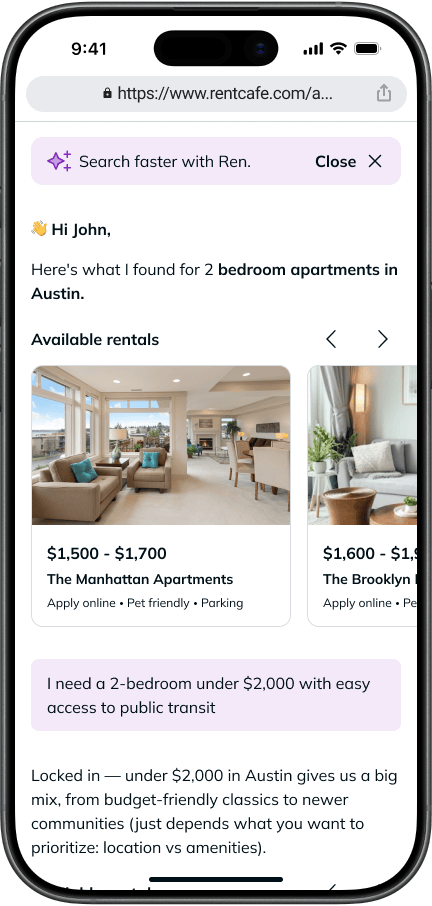
You don’t need to know the exact filters you want. Ren infers them from how you describe your life:
- Mention a dog, and it adds pet-friendly
- Say you work from home, and it looks for a home office
- Describe what’s nearby (“near Union Square,” “close to campus”) instead of guessing the ZIP code
Each response helps refine your results.
How do results update in Ren?
As you chat, results update automatically in real time.
You’ll see:
- Apartments that match your preferences
- Key details like pricing and features
You can change your mind mid-search. Tell Ren you want to raise your budget, drop a requirement or look in a different area, and it updates your search and refreshes the results.
If your search returns few or no results, Ren suggests adjustments — like revising your budget, considering a nearby neighborhood or relaxing a hard-to-find amenity — so you can keep exploring without starting over.
Can I ask Ren about specific apartments?
Yes. Once a listing catches your eye, you can ask property-level questions right in the chat, without leaving the conversation:
- Pet policy details: “Does this building allow large dogs?”
- Side-by-side comparisons: “How does 110 East 7th Street compare to 622 East 11th Street?”
- Square footage and floor plans: “Which has the biggest 2-bedroom floor plans?”
- Rent specials and pricing: “Which apartment has move-in specials?”
- Review summaries: “What do residents say about this property?”
Every detail Ren shares is sourced from active, up-to-date RentCafe listings, so what you see in the chat matches the listing page.
Can I switch to map view?
Yes. Ren includes a map view that sits alongside the conversation.
You can:
- Tap the map button to view listings on a map
- Select price pins to preview properties
- Open full listings from the map
You can switch back to the conversation at any time without losing your progress.
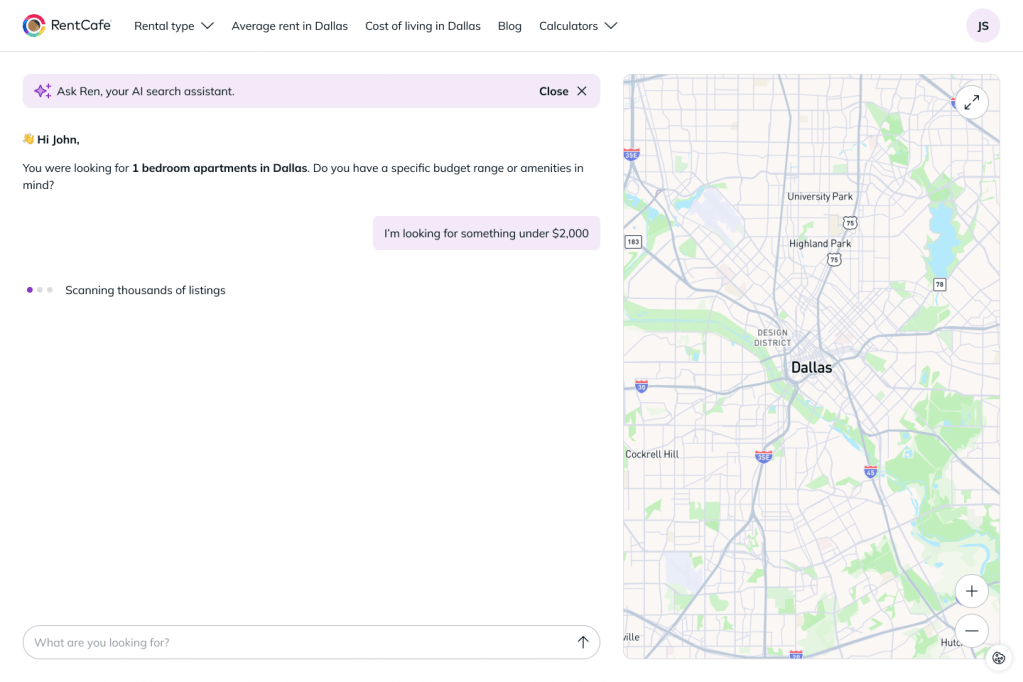
Tip: The map in Ren is designed to complement your chat results. Moving around the map won’t update your listings the way it does in standard search. To refine your results, ask Ren in the chat.
What can I do when I find an apartment I like?
Once you find a listing, you can open it to view full details.
From there, you can:
- Browse photos and amenities
- Review pricing and availability
- Contact the property
- Schedule a tour
- Start your application
The experience is the same as regular RentCafe listings.
FAQ
A: Ren is your apartment search assistant on RentCafe. You describe what you’re looking for in plain language, and it guides you to the right match through a two-way conversation — asking follow-up questions, suggesting neighborhoods and refining results in real time.
A: Regular search finds matches from a single description or set of filters. Ren is an ongoing, two-way conversation that actively guides you — acknowledging what you’ve shared, asking what it still needs to know and adjusting as you change your mind.
A: Yes. Ren only surfaces real, available apartments from live RentCafe listings. It won’t invent a property, a price or an amenity.
A: No. Your location, price range, bedroom count and filters carry over automatically.
A: No. Ren infers filters from how you describe your needs and lifestyle — mention a dog and it adds pet-friendly, or describe what’s nearby instead of guessing the ZIP code.
A: Yes. You can adjust your preferences at any time — change your budget, swap the bedroom count, add or remove amenities — and results update in real time.
A: Yes. You can use filters before opening Ren or return to standard search whenever you want.
A: Yes. You can switch between the chat and map view at any time. Keep in mind that moving around the map won’t update your listings — to refine your results, ask Ren in the chat.
A: Yes. Ren is available for all locations on RentCafe.com, from big cities to smaller markets.