
Share this article:


Apartment hunting usually starts the same way: You type a city, choose the number of bedrooms, set a budget and start scrolling. It works, but when you don’t know exactly what you want or your needs are harder to capture (good transit access, a quiet street, room for both a desk and a dog), you might feel the need for some guidance.
Ren — formerly known as AI Mode on RentCafe — is built precisely for those moments. Think of it as your apartment search assistant that helps you find and compare apartments through conversation. Ren lets you describe and refine a search in everyday language, then explore options sourced from trusted, up-to-date RentCafe listings.
Key takeaways
- Ren is a built-in apartment search assistant on RentCafe.com that helps you find a home through a two-way conversation, just like a personal leasing assistant.
- Go beyond location: You can describe your ideal apartment to Ren by mentioning your budget, preferred amenities, number of bedrooms, lifestyle or the vibe you are looking for. It all happens just like a normal conversation.
- You can ask Ren details about the property you’re interested in, like pet policies, square footage, rent specials, side-by-side comparisons, without leaving the chat.
- Every property, price and amenity recommended by Ren comes from active RentCafe listings; nothing is made up.
- If you already started a search on RentCafe.com and want to take a shortcut to find your next home, just click on “Ask Ren” and the assistant will take it from there.
How is Ren different from regular search?
RentCafe’s search feature already lets you describe what you want in plain language — for example, “pet-friendly 1-bedroom in Dallas under $1,800.” You describe, it finds the best matches.
Ren goes further. It’s an ongoing, two-way conversation. Instead of one search and a list of results, Ren actively guides you to apartments that actually match what you have in mind: It acknowledges what you’ve already told it, asks the right follow-up questions to properly understand what you’re looking for, suggests neighborhoods and the best apartments and refines results as you go.

How Ren guides your apartment search: A real example
Picture this: You’re looking for a 2-bedroom in Minneapolis under $2,000, with easy access to public transit — but you’re not sure which neighborhood makes the most sense.
With Ren, the conversation will unfold like this:
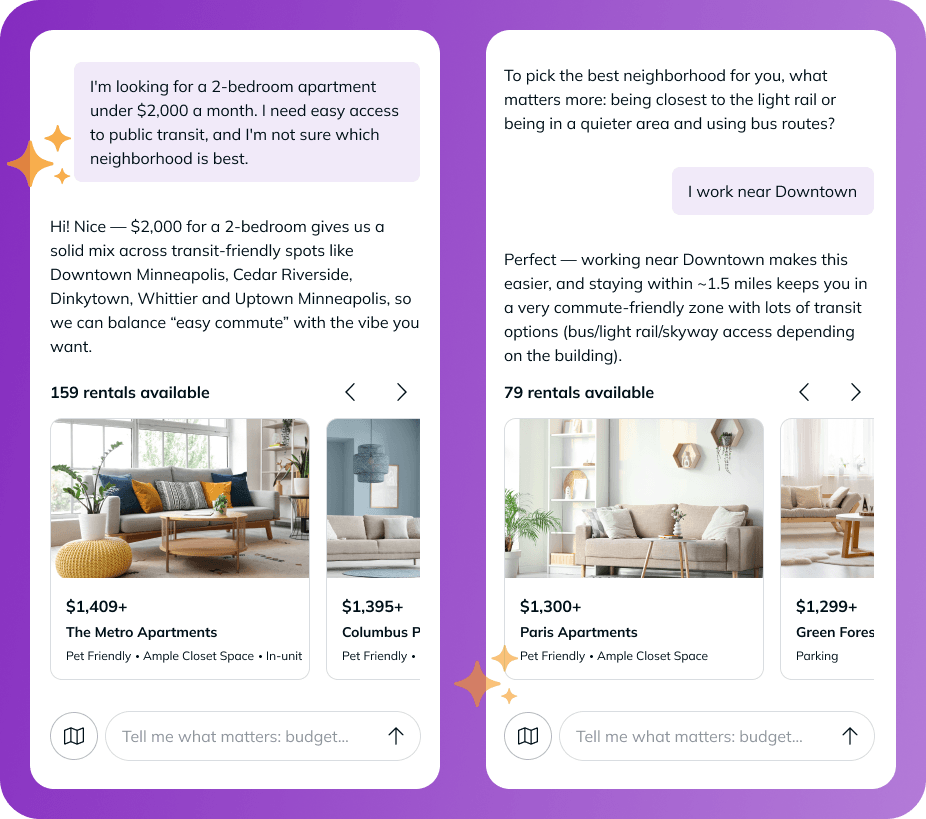
You are browsing through apartments in Minneapolis, click on Ask Ren and start typing: “I’m looking for a 2-bedroom apartment under $2,000 a month. I need easy access to public transit, and I’m not sure which neighborhood is best.”
Ren: “Hi! Nice — $2,000 for a 2-bedroom gives us a solid mix across transit-friendly spots like Downtown Minneapolis, Cedar Riverside, Dinkytown, Whittier and Uptown Minneapolis, so we can balance ‘easy commute’ with the vibe you want.”
Ren acknowledges the budget and transit need, suggests real neighborhoods and listings, then asks follow-up questions to refine the search further: “To pick the best neighborhood for you, what matters more day-to-day: being closest to the light rail or being in a quieter area and using bus routes?”
When you reply: “I work near Downtown,” Ren refines the list to options in that area and within a short commute and updates the results in real time, while keeping your budget in mind.
In a single exchange, you get three things a one-shot filter can’t deliver:
- A short list of the best apartments that fit your needs.
- Context for why the suggested neighborhoods make sense (public transit options, within budget).
- A follow-up question that narrows the search further (commute destination).
Each new message sharpens your particular scenario and the experience moves naturally from a broad search to a focused match.
What can you do with Ren?
In a conversation with Ren, you can:
- Describe your priorities in plain language, from ideal location to budget and even lifestyle needs like parking or gym.
- Adjust your preferences as you go — change the budget, swap the bedroom count, look for unique amenities or remove those that are not mandatory.
- Ask for suggestions when you’re not sure where to start.
- Switch between the chat and the map view without losing your progress.
Your existing search criteria carry over automatically, so if you arrived from a search like “1-bedroom in Dallas, modern vibes” Ren picks up where you left off and only asks what it still needs to know.
Real listings, real information
Ren never makes up a property, a price or an amenity. Every detail is sourced directly from trustworthy, up-to-date listings. When Ren tells you an apartment costs $2,275 or that it allows pets, that information matches what you see on the listing page itself.
This means the conversation is both helpful and grounded. Ren pulls its information from what property managers provide, so you’re getting real details straight from the source.
When plans change mid-search
Apartment hunting is rarely a straight line. Ren is built for the moments when plans change:
- When you change your mind. If you decide mid-conversation that you want to drop the “in-home laundry“ or increase your budget by $200, just say so. Ren updates your search and the results refresh.
- When you want to compare options. Pick the properties you like best and ask it to compare them. You’ll get a summary of the most important details so you can make a quick choice.
- When you get no results. Maybe your budget is too low for the location, or the amenities you’re looking for are not common in that neighborhood. Ren suggests practical adjustments so you can keep exploring. That might mean revising your budget, considering a nearby neighborhood or replacing a less common amenity.
Property-level questions, answered right in the chat
Once a listing catches your eye, you don’t have to leave the chat to explore the details. Ren can help with the kinds of questions that usually require clicking through multiple pages:
- Pet policy details: “Does this building allow large dogs?”
- Side-by-side comparisons: “How does 110 East 7th Street compare to 622 East 11th Street?”
- Square footage and floor plans: “Which has the biggest 2-bedroom floorplans?”
- Rent specials and pricing: “Which apartment has move-in specials?”
- Review summaries: “What do residents say about this property?”
You can still open any listing for the full picture — photo galleries, full amenity lists, floor plans — but the routine questions get answered right inside the conversation, so you spend less time clicking and deciding.
Can you explore listings on a map?
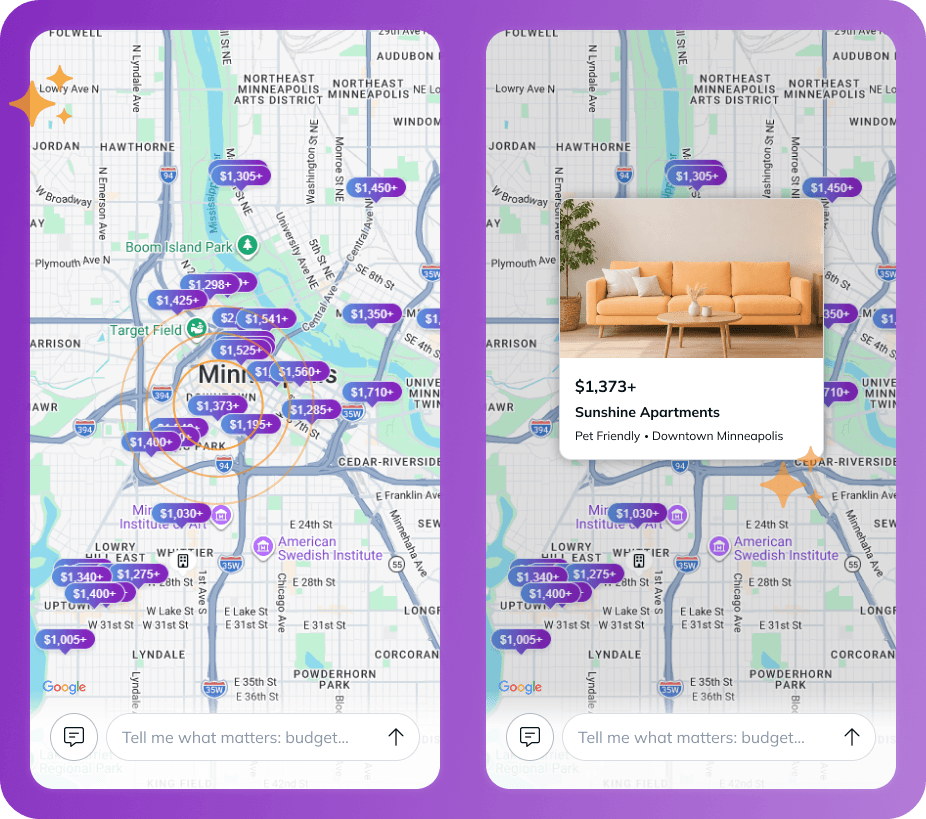
Yes. Ren includes a map view that sits alongside the conversation. Tap the map button to switch from the chat to a map of available apartments shown as price pins. Selecting a pin opens a quick preview and you can return to the conversation any time without losing your search or results.
From search to the next step
When you find a place you like, opening the listing gives you the same full details you’d find anywhere else on RentCafe — full photo galleries, amenities, pricing and availability. From there you can contact the property, schedule a tour or start your online application, just like you would in a standard RentCafe search.
The experience stays consistent from start to finish: Ren helps you find your match and RentCafe handles the rest.
Is Ren right for your next apartment search?
If you already know exactly what you want, traditional RentCafe search is still a great way to go.
Ren shines when:
- You’re early in your search and still figuring things out.
- Your needs are easier to describe than to filter (commute access, neighborhood feel, lifestyle fit).
- You want a helping hand rather than a list to scroll through.
You can switch between the two whenever you want — and your search criteria carry over either way.
What’s next
This is just the start. Ren will keep getting smarter, with sharper recommendations and new ways to surface useful insights, so the apartment search experience on RentCafe gets easier and better as it evolves.
Start browsing RentCafe today and see how a quick conversation can turn into a successful apartment search.
FAQ
Q: What is Ren?
A: Ren is a conversational search tool on RentCafe. You tell it what you’re looking for in plain language, and it guides you to the right match through a back-and-forth conversation, asking follow-up questions, suggesting neighborhoods and refining results in real time.
Q: How is Ren different from regular RentCafe search?
A: Ren is a two-way conversation that actively guides you — acknowledging what you’ve already shared, asking what it still needs to know and adjusting as you change your mind.
Q: Are the apartments Ren shows real?
A: Yes. Ren only surfaces real, available apartments from live RentCafe listings. It will not invent a property, a price or an amenity. Every detail comes from up-to-date listing data.
Q: Do I need to start from scratch when switching to Ren?
A: No. Ren carries over your existing search criteria — location, price, bedroom count and any filters — so you can continue where you left off.
Q: Do I have to know the exact filters I want?
A: No, Ren infers filters from how you describe your life. Mention a dog and it adds pet-friendly. Say you work from home and it looks for a home office. Describe a family of four and it recommends a bedroom range. You can also describe what’s nearby (“near Union Square,” “close to campus”) instead of guessing the zip code.
Q: Can I ask Ren about specific apartments?
A: Yes. You can ask about pet policies, square footage, rent specials or resident reviews, and even compare two listings side by side.
Q: What happens if my search returns very few or no results?
A: Ren will suggest ways to broaden your search, like adjusting your budget, considering nearby neighborhoods or relaxing a hard-to-find amenity, so you can keep exploring.
Q: Can I change my mind mid-search?
A: Yes. Ren adapts in real time. Tell it you want to raise your budget, drop a requirement or look in a different area. It updates your search profile and refreshes the results.
Q: Can I still use the map view in Ren?
A: Yes! You can switch between chat and map view at any time. The map shows you exactly where your suggested rentals are located, so you can get a sense of the neighborhood and surroundings. Keep in mind that the map in Ren is designed to complement your chat results — moving around the map won’t update your listings the way it does in the standard search. To refine your results, just ask Ren in the chat.
Q: What happens when I find a listing I like?
A: You can open the listing to view full details, then contact the property, schedule a tour or start your application, the same way you would in a standard RentCafe search.
Q: Is Ren available for all cities?
A: Yes. Ren is available for all locations on RentCafe.com, so you can use it to search for apartments nationwide — from big cities to smaller markets.
Share this article:


Florin Petrut
Florin Petrut is a real estate writer and research analyst with RentCafe, using his experience as a social media specialist and love for storytelling to create insightful reports and studies on the rental market. With a strong interest in the renter experience, he develops data-driven resources that explore cost of living, affordable neighborhoods, and housing trends, helping renters make informed decisions about where and how they live. Florin holds a B.A. in Journalism and an M.A. in Digital Media and Game Studies.
Sign up for The Ready Renter newsletter
Get our free apartment hunting guide — plus renting tips, trends and research.




Related posts

Meet Ren, your apartment search assistant on RentCafe.com
Apartment hunting usually starts the same way: You type a city, choose the number of bedrooms, set a budget and start scrolling. It works, but…

Your happy place is just a conversation away with the new RentCafe app in ChatGPT
Meet the new RentCafe app in ChatGPT, an exciting step forward in apartment search. It combines the trusted rental listings platform used by millions of renters with the conversational power…

See what you’ll really pay: RentCafe introduces Total monthly cost and the Cost calculator
RentCafe listings now display the Total monthly cost and the Cost calculator, two new features designed to give you a clear, complete picture of what…
Subscribe to
The Ready Renter newsletter