
How to find apartments with natural language search on RentCafe
Summary
RentCafe’s natural language search lets you find apartments by describing what you’re looking for in your own words. Type something like “pet-friendly one-bedroom under $1,800” in the search bar and get matching results instantly. You can search for apartments across the U.S. and Canada on RentCafe.com.
What is natural language search?
With natural-language search, you describe the apartment you want the way you’d tell a friend, and RentCafe sets up the search for you. You don’t have to choose options from several menus and checkboxes one at a time.
For example, type “two-bedroom in Austin under $2,000 with a pool” to see listings that match your desired location, budget, size and amenities at once.
How do I use natural language search on RentCafe?
The search bar on RentCafe.com accepts conversational queries. That means you can just write what you’re looking for in your own words:
- Go to RentCafe.com
Open RentCafe.com in any web browser, on your computer or your phone.
- Type what you’re looking for
In the search bar, describe the apartment the way you’d say it out loud. Include what matters most, such as the city or neighborhood, your budget, the number of bedrooms and must-have features.
- Review your matches
RentCafe applies filters for everything it recognizes in your search, such as location, price, size and amenities, so the listings you see match your request.
- Refine your search
To add or change details, type them in the search bar on the results page. Your results update right away.
Can I refine my search after I see results?
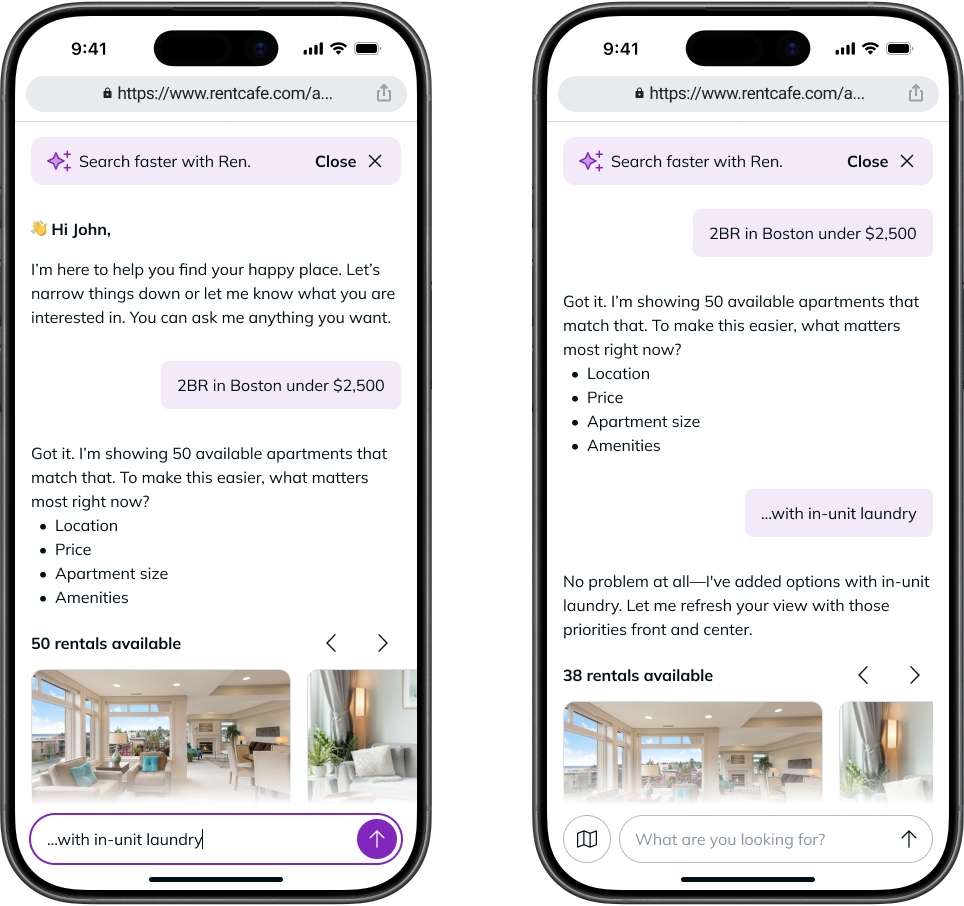
Yes. Natural language search doesn’t end after the first results page. Once you see listings, you can keep typing adjustments into the search bar. Your results update right away.
For example, say you start with:
- “2 bedroom in Boston under $2,500”
After browsing, you decide you also need in-unit laundry. Simply add this to your search:
- “…with in-unit laundry”
RentCafe updates your results to show only apartments that have in-unit laundry. There’s no need to start over, just keep refining until you find the right apartment.
Tip: Shorthand works too. You can type “BR” or “bd” instead of “bedroom.”
Search examples for common renter needs
Here are three examples showing how natural language search works for different situations:
1. How to search for pet-friendly apartments
If you have a pet, checking each listing’s pet policy can slow down your search. RentCafe gives you two ways to see only apartments that welcome your pet.
The quickest is to search in your own words. Type something like “dog-friendly one-bedroom near the West Village,” and RentCafe shows you apartments that match your size, location and pet needs in one step.
If you prefer using filters, click on “Filters” and select “1 bed” and “Dogs,” then use the map to focus on the area you want. The “Dogs” filter shows only apartments that allow dogs.
2. How to search when you’re moving to a new city
If you’re moving to a city you don’t know well, you can start with a neighborhood name instead of learning the map first.
Type something like “studio near the West Loop in Chicago,” and RentCafe shows you studios in and around that area. From there, use the map to explore what’s nearby.
3. How to search for accessible apartments
If you need an accessible home, searching in your own words helps you find apartments with the features you rely on. Type something like “wheelchair-accessible apartment in San Francisco,” and RentCafe narrows your results to apartments that list those features.
Listings can include details that matter for daily life, such as step-free entry and accessible bathrooms, so you can quickly tell whether an apartment works for you.
Tip: Each property chooses which accessibility features to list, so a feature you need might not appear even if the apartment has it. Contact the property to confirm before you schedule a tour or apply for an apartment.
Is natural language search faster than using filters?
It can be, especially when you have several must-haves. Instead of setting each filter one at a time, you type everything in one sentence, and RentCafe applies it all at once. Here’s what that means:
- Fewer steps: describe your budget, location, size and features in one sentence
- Easy to adjust: add or change details by typing, without starting over
- Natural to use: search the way you’d describe your ideal apartment to a friend
Ready to try it? Visit RentCafe.com and type what you’re looking for in the search bar to see it in action.
FAQ
RentCafe applies the details it recognizes in your search, such as location, price, size, amenities and pet policy. The more specific you are, the more closely your results match what you want. Properties choose which features to list, so contact the property to confirm anything that’s important to you.
Natural language search is available on RentCafe.com through your web browser on any device, including your phone.
You still see results based on the details RentCafe recognized. To get closer matches, rephrase your search or add details like a city, budget or number of bedrooms.
Yes. Filters are available on RentCafe.com alongside natural language search, so you can use whichever you prefer.
You can use this feature to search for apartments anywhere in the U.S. and Canada with listings on RentCafe.com.
No. Natural language search is available to everyone who visits RentCafe.com. No account or sign-up is required to search for apartments.