
Introducing a brand-new apartment search mobile app: Search with AI agent Ren, browse via scrollable video feed, apply in the app
Share this article:


Apartment Search by RentCafe is here, and it’s the first mobile app in the industry to offer a seamless renting journey from search to application. Available now on iOS, it combines a social-media-style video feed with Ren (RentCafe’s AI apartment search agent) to help you find, compare and select your next home.
Key takeaways:
- One app, from search to application. Apartment Search by RentCafe is the first one to connect search, tour and application into a single seamless experience — no bouncing between platforms.
- Ren gets you there faster. Describe your ideal apartment in your own words and let our AI surface the right matches.
- Scroll with purpose. The social-media-style video feed turns everyday browsing into apartment discovery.
- Available now on iOS.
If you’ve searched for an apartment on RentCafe.com, you already know you’re getting one of the best apartment search experiences out there: verified listings, real resident reviews, conversational search and tools that make apartment hunting easy.
What the mobile app does is put all of that right in your pocket. Here’s why it’s worth downloading.
The RentCafe app offers multiple ways to search, including video, AI and browsing
Searching for an apartment is personal. That’s why the RentCafe app gives you more than one way to find your happy place:
- Swipe through videos. A vertical, social-media-style feed of apartment walkthroughs you can browse in seconds.
- Ren. RentCafe’s AI apartment search agent. Describe what you want in plain language and get matched with listings instantly.
- Browse rentals. The classic search, elevated. Use the map and GPS search and filters to explore neighborhoods.
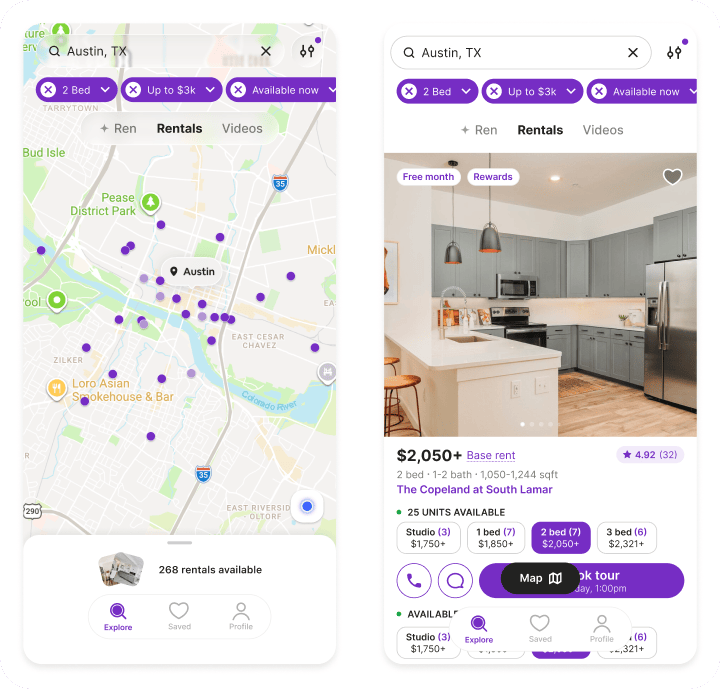
Whether you like to browse through videos, filter by must-haves or let smart recommendations do the work, each search mode draws from the same collection of verified listings, so the best results always surface.
1. Why video tours make apartment hunting easier in the RentCafe app
The RentCafe app’s video feed lets you swipe through short, vertical apartment walkthrough videos, the same way you would through a social media feed. You can also tap once to save a property or jump to the full listing. From there, you can contact the property, schedule a tour or apply.
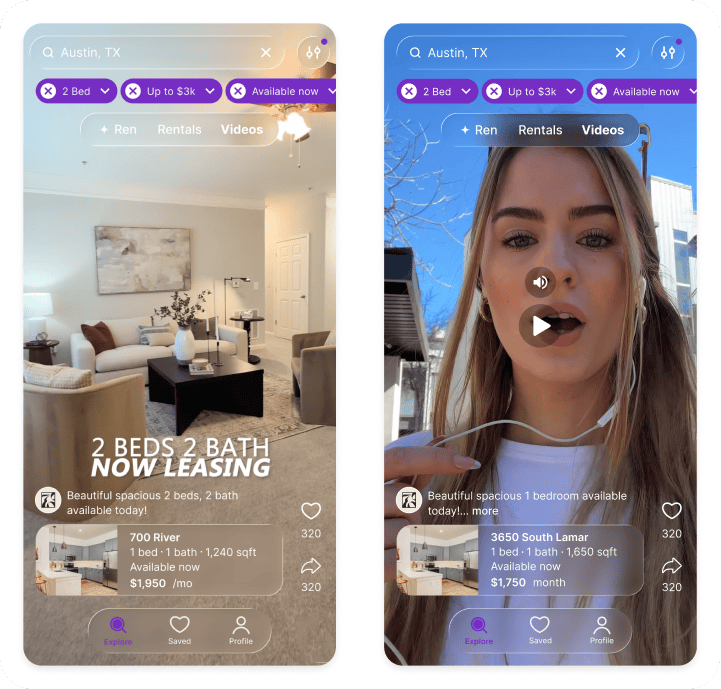
Beyond photos and data, the video feed gives you a feel for an apartment’s character and atmosphere before you visit in person.
2. How to use Ren in the mobile app to find apartments that fit your needs
Ren is RentCafe’s AI apartment search agent (formerly known as AI Mode), that refines apartment search results conversationally. Ren asks follow-up questions and adjusts matches so you don’t need to use filters or navigate dropdowns.
You just describe what you want in plain language like you’re talking to a friend, and Ren finds it. It handles queries like: “I have an 85 lb Golden Retriever. Need a place in Austin under $2,400 with no breed/weight limits, near a park/trail, and in-unit laundry for muddy paws.“
Budget, location, lifestyle, dealbreakers — Ren takes it all in and returns listings that match what you said, not just what a filter could approximate.
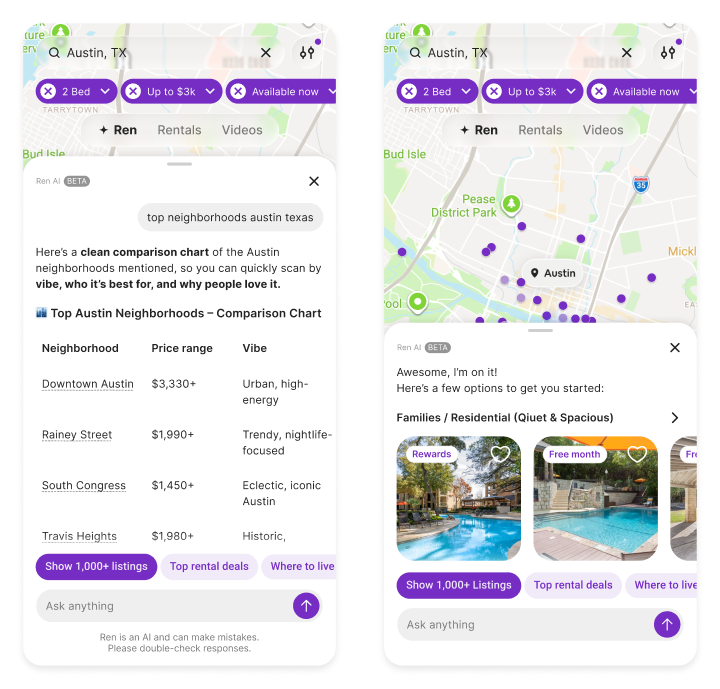
Here’s an example that describes the Ren apartment search experience: It’s Saturday. You’re on the couch with coffee and your lease is up in two months. You open the RentCafe app and type: “One-bedroom in Dupont Circle, under $2,500, pet-friendly.”
Within seconds, Ren responds with a curated set of options, complete with names, starting prices and direct links to each listing. It also points out which properties include move-in specials. Then, instead of leaving you to sort through results on your own, Ren asks: “Want to compare two of these side by side, or should we dig into one building’s details?“
You type back, “Let’s compare the first two properties.” Ren pulls up the details for each one in the same conversation. Soon, you spot a listing that checks every box. The resident reviews confirm it, so you schedule a tour for Tuesday afternoon.
You visit, you love it. Next, you tap Apply, fill everything out in minutes and submit — all inside the app.
3. How filters in the RentCafe app help you narrow your apartment search
Prefer the hands-on approach? Browsing rentals gives you full control. Explore neighborhoods with map and GPS search, then narrow results instantly with filters for price, bedrooms, amenities, pet policies or rent specials. Saved searches, favorites and push notifications keep track of what you like and flag new matches.
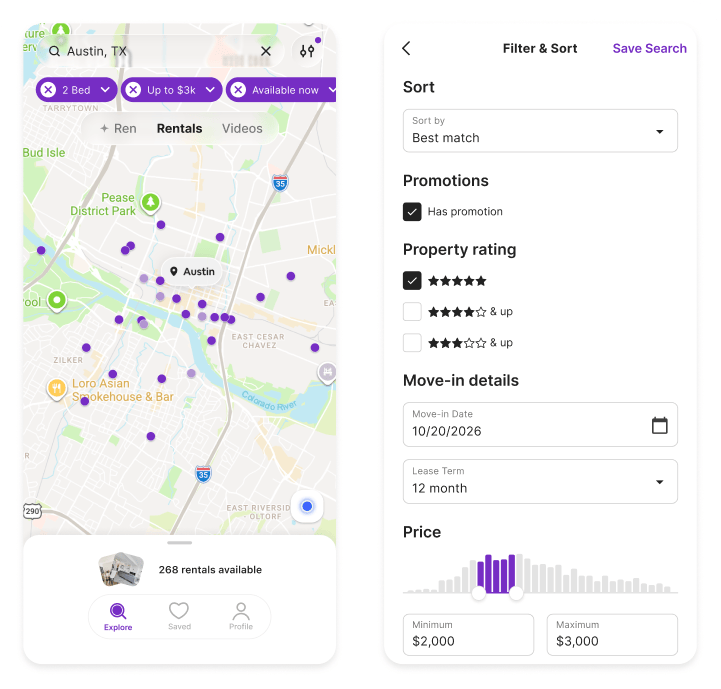
When you find a listing you like, read what residents say about it and apply without switching apps or losing your place.
What other features does Apartment Search by RentCafe include?
In addition to the three search modes, the RentCafe app packs features into every listing that help you evaluate, decide and act without leaving the app.
- 3D apartment tours. Walk through a space from your phone to explore the layout and check room sizes from the comfort of your couch.
- Verified resident reviews. Read real feedback from people who live there. Everything from how fast maintenance responds to what the noise level is like.
- Contact and schedule tours. Reach out to a property or book a tour directly from the listing, on the property’s own calendar.
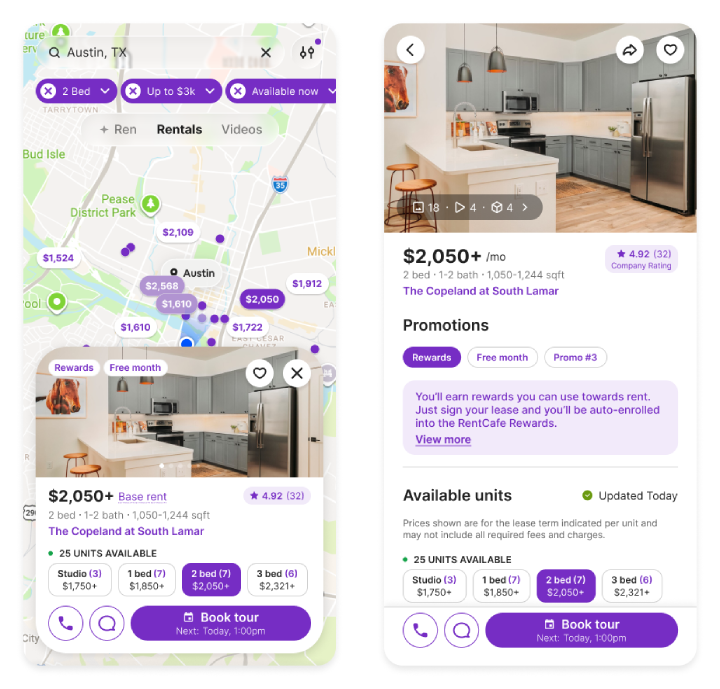
The RentCafe app connects search, tours and applications in one place
The RentCafe mobile app is purpose-built for how renters search on their phones. It’s the first app designed to carry you through every stage without ever breaking the experience.
Your home affects everything from how you get to work to what you do on weekends and how far your budget stretches. Finding the right one is a big deal, and the tools you use to search should reflect that.
Getting started takes under a minute
Download the app from the App Store and answer a few quick questions about location, price range, bedrooms and move-in date to see relevant listings right away. You can browse without an account, but creating one unlocks saved favorites, saved searches and push notifications. For step-by-step setup and feature guides, visit the RentCafe Help Center.
FAQ
A: Yes. The app is completely free to download and use.
A: No, the RentCafe app is currently only available on iOS.
A: Ren is RentCafe’s AI apartment search agent formerly known as AI Mode. Instead of setting filters manually, you describe what you’re looking for in your own words — like telling a friend — and Ren finds listings that match.
A: It’s a vertical, swipeable feed of apartment video walkthroughs, similar to scrolling through social media apps. Save videos you like and tap through to the full listing to take action.
A: Yes. Listings that offer 3D tours let you explore the space directly inside the app. You can walk through rooms, check layouts and get a real sense of the apartment before visiting in person.
A: Absolutely. Create your account to save your favorite listings and searches and turn on push notifications to get alerted when new apartments match your criteria.
A: The app includes map and GPS search, filters (price, bedrooms, amenities, pet policy and more), saved searches, favorites and push notifications.
Share this article:


Adina Dragos
Adina Dragos is a real estate writer and research analyst with RentCafe. She has solid experience in real estate writing, covering topics ranging from best cities for renters and the top cities for rental activity to cost of living. Her work was featured in several prominent media channels such as Axios, The Dallas Morning News, ConnectCRE and The New York Times.
Sign up for The Ready Renter newsletter
Get our free apartment hunting guide — plus renting tips, trends and research.




Related posts

Introducing a brand-new apartment search mobile app: Search with AI agent Ren, browse via scrollable video feed, apply in the app
Apartment Search by RentCafe is here, and it’s the first mobile app in the industry to offer a seamless renting journey from search to application….

Why two background checks can show different results: name-based vs. fingerprint-based records
You applied for an apartment and got a screening report with a criminal record you don’t have. A few months later you’re asked for a…

Akron vs. Cleveland: Which Ohio city is easier on your wallet?
Akron, OH, offers renters a more affordable alternative to Cleveland. As of late October 2026, the average rent in Akron is $1,148 per month, compared…
Subscribe to
The Ready Renter newsletter