
What happens after submitting a RentCafe application?
Summary
After you submit a RentCafe application, you’ll receive payment confirmation if you paid an application fee. Your application then enters a review period that typically takes a few days, during which the leasing team reviews your information and documents. You can log in to your account to monitor your application and complete any remaining details while you wait. If approved, the property prepares your lease and sends it to you for electronic signature.
What happens right after you submit your application?
After you submit your application, a few things may happen right away.
If you paid an application fee, you should receive confirmation that your payment was submitted. This confirms the payment step was completed, but it does not mean the application has been approved.
Your application will then move into the property’s review process. At this stage, the leasing team can review your information, documents and any screening results required for the application.
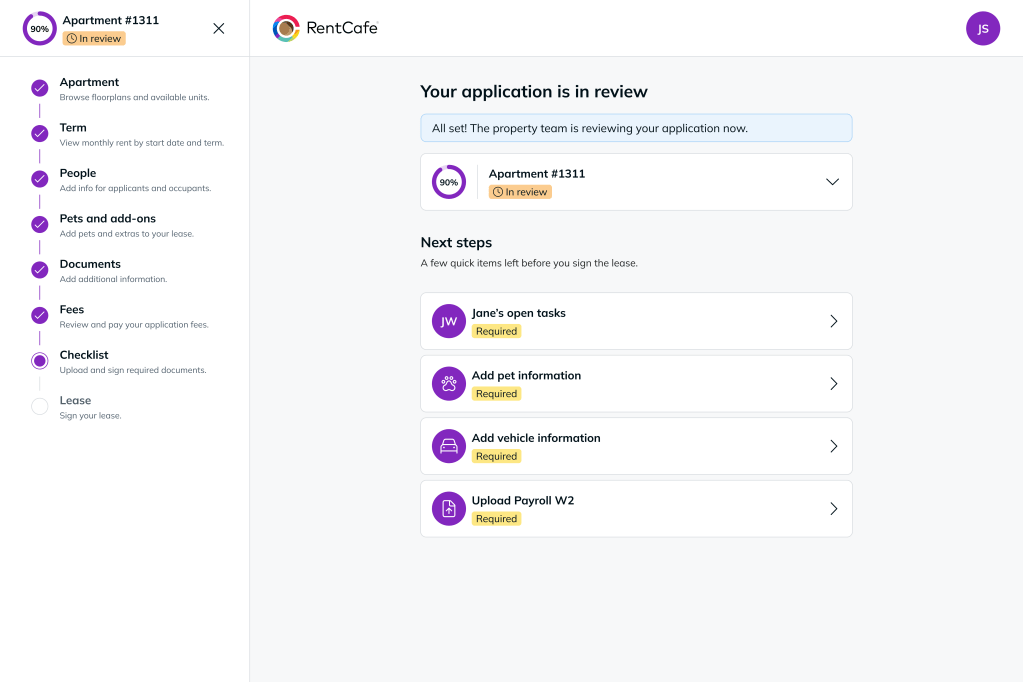
What happens during application review?
Once your application is submitted, the property begins reviewing it.
During this stage, the property may:
- Review your application details
- Confirm required documents were submitted
- Complete applicant screening
- Review payment confirmation, if an application fee was required
- Contact you if more information is needed
Screening may begin automatically after submission or the property may start it manually. Timing depends on the property’s review process.
In most cases, no action is required unless the property contacts you or your account shows required next steps.
How will I know if my application is approved?
After screening and review, the property will approve or deny the application.
If your application is approved, you will receive an email letting you know. You can also log in to your account to check for updates, next steps or lease-related tasks.
What happens after approval?
After approval, the property prepares your lease.
Once the lease is ready, it will be sent to you for electronic signature through your RentCafe account. You may need to complete required tasks before the lease becomes available for signing.
These tasks may include:
- Adding pet or animal details
- Adding vehicle information
- Adding an emergency contact
- Uploading or confirming required documents
What happens after I sign the lease?
After you sign the lease electronically, the property reviews and countersigns it.
Once both parties have signed, the lease is complete. Your application then moves closer to move-in and you may see additional move-in tasks or checklist items in your account.
These may include:
- Setting up renters’ insurance
- Setting up utilities
- Completing move-in checklist items
- Reviewing signed lease documents
Where can I view my application after submitting?
After submitting your application, you can log in to your RentCafe account to review your application details and status.
For step-by-step instructions, see our guide:
👉 How do I check my RentCafe application status?
What information can I access after submitting my application?
Once your application is submitted, you can access several sections related to your application.
These include:
- Your application summary
- Uploaded documents
- A “Next steps” section with required or pending items
- Options to print or download your application
- The option to cancel your application
What can I find in the “My documents” section?
In the documents section, you can review files for the main applicant and any roommates or co-applicants.
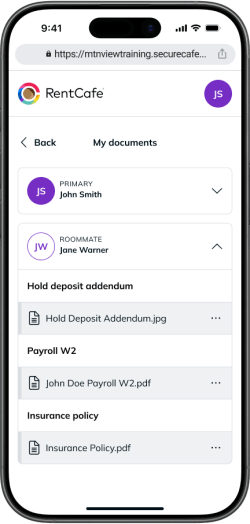
You will see documents such as:
- Hold deposit addendum
- Insurance policy
- Payroll W2
Once your application is approved and your lease is signed, your signed lease document will also appear here.
What can I do while waiting for approval?
While your application is being reviewed, you can complete additional information to prepare for move-in.
How can I check my roommate’s progress?
If you added a roommate, you can:
- See whether they submitted required documents
- Confirm completion of items like:
- Hold deposit addendum
- W2 form
You may also be able to send them a reminder if something is missing.
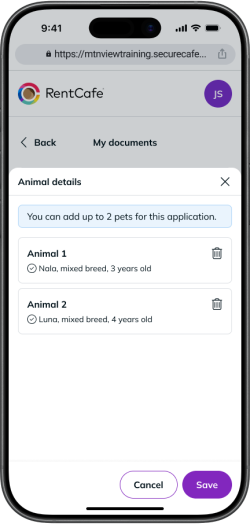
How do I add pet information?
If you plan to move in with a pet, you will need to provide details such as:
- Name
- Breed
- Age
- Weight
- Vaccination status
- Spay/neuter status
- Service or support animal status
How do I add vehicle details?
If you selected parking or a garage, you will need to add the following information for your vehicle:
- Year
- Make
- Model
- Color
- License plate number
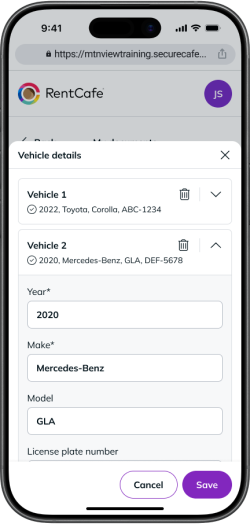
If you don’t have a vehicle, you can indicate that and add one later.
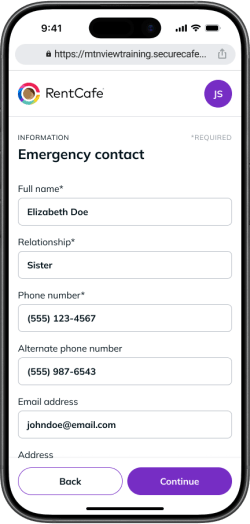
How do I add an emergency contact?
You will be required to provide:
- Full name
- Relationship
- Phone number
- Alternate phone number, if applicable
- Email address
- Physical address
Do I need to complete everything before approval?
No. Most of this information can be added either:
- While your application is under review
- Or after your application is approved
However, completing it early may help avoid delays later.
What should I do if my application is still under review?
This is normal. Reviews typically take a few days. If it takes longer than expected, contact the property directly for an update.
Why don’t I see my application?
A few things to check:
- Make sure you’re logged into the correct account.
- Check whether you applied through RentCafe or a property website.
FAQ
It usually takes a few days, but timing may vary depending on the property, screening process and whether additional information is needed.
No. Payment confirmation only means your application fee payment was submitted. Your application still needs to be reviewed by the property.
Yes. In many cases, you can update details like pets, vehicles or emergency contacts while waiting or after approval.
In most cases, the property will contact you once a decision is made. You can also log in to check updates.
The property prepares your lease and sends it to you for electronic signature. After you sign, the property countersigns the lease and you can continue preparing for move-in.