
How to earn RentCafe Rewards points
Summary
You can earn RentCafe Rewards points by shopping for offers from your favorite brands and by signing up for Renter Essentials like renters insurance, internet, security deposit replacement and more through your RentCafe account.
Once you join RentCafe Rewards, you can earn points:
- By signing up for eligible Renter Essentials available in your RentCafe account, such as renters insurance, internet, security deposit replacement, rent payment reporting and more.
- By shopping saved offers for your favorite brands and uploading your receipts through RentCafe.
Available services may vary by property and include renters insurance, internet, security deposit replacement, rent payment reporting and more.
How to earn points
Renter Essentials
1. Sign in
Log in to your RentCafe account.
2. Browse available services
Find eligible services in the move-in checklist inside your account.
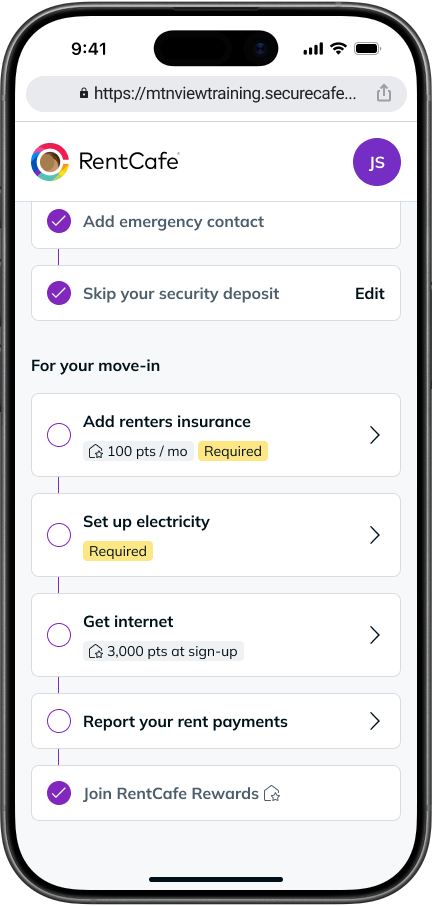
Tip: If you’re already a resident at a RentCafe partner property, go to the “Renter Essentials” section within your RentCafe account to view what’s available at your property.
3. Sign up for a service
Select any service marked as eligible for RentCafe Rewards points to start earning.
Shopping offers
1. Browse offers from your favorite brands
Explore available offers in the RentCafe Rewards dashboard.
2. Save your favorites
Add offers to your wishlist before you shop for them to be eligible for points.
3. Make a purchase and upload your receipt
After shopping, upload your receipt through RentCafe to earn points.
How many points can I earn?
See how many RentCafe Rewards points you can earn from each service that may be available through RentCafe below:
Renters insurance (ResidentShield Insurance)
Earn 100 points every month you have an active ResidentShield renters insurance policy.
Many properties may require renters insurance as a condition of move-in, so this is a simple and consistent way to keep your points balance growing.
Internet & entertainment (RentCafe Internet)
Earn a one-time lump sum when signing up for RentCafe Internet services. Points are awarded after 90 consecutive days of active service.
- 3,000 points — New internet sign-up
- 600 points — New entertainment (streaming) sign-up
- 375 points — New mobile service sign-up
- 375 points — Service upgrade or transfer for any of the services above
Security deposit replacement (Obligo)
Earn a one-time 500-point bonus when you sign up for security deposit replacement.
Rent payment reporting and credit monitoring (IdentityIQ®)
You can sign up for rent payment reporting for free as a RentCafe Rewards member.
When you upgrade your rent payment reporting service, you earn:
- 250 points (one-time bonus) for signing up for Historical Rent Reporting
- 75 points per month for maintaining an active Credit Advantage account
Point values vary for shopping offers.
New services and ways to earn points can become available at your property at any time, so check your RentCafe account regularly for more chances to earn points.
Once you start earning points, you can redeem them for a variety of rewards through the RentCafe Rewards Marketplace, available in your dashboard. Depending on the options available, you can exchange your points for gift cards, experiences, merchandise and more.
FAQ
In most cases, recurring monthly services like ResidentShield renters insurance will earn you points each month as long as your account or policy stays active. For one-time bonuses, points are typically awarded to new sign-ups. Check your services for more details.
Points are typically added to your balance after a qualifying transaction or at the end of a monthly billing cycle, depending on the action.
For example, monthly services may add points after each billing cycle, while certain sign-up bonuses are added once the required conditions — such as a service being active for a specific period — are met.
Yes, points expire two years after earning them. In the RentCafe Rewards Marketplace, points are used on a first-in, first-out basis, meaning you’ll spend your oldest points first. Keep an eye on your balance in your RentCafe account, so you don’t miss any rewards.
As a RentCafe Rewards member, you can view your points balance at any time at the top of your RentCafe account and in your RentCafe Rewards dashboard. From your dashboard, you can then view your points earning history, browse the marketplace by category, redeem your points and more.
Yes. You’ll need to save the offer before making your purchase. If the offer wasn’t saved before the date on the receipt you upload, it won’t be eligible for points.