
How long does it take for my RentCafe Rewards points to appear in my account after signing up for a service?
Summary
RentCafe Rewards points are added to your account at different timeframes depending on the service you signed up for. You’ll need to join RentCafe Rewards first and keep using your service for the required period to earn your points.
Below is a quick overview of when to expect your RentCafe Rewards points after signing up for a service, followed by a detailed breakdown for each service. Remember that you must first join RentCafe Rewards to be able to earn points for service sign-ups and payments.
| Service | When points appear |
|---|---|
| Renters insurance | 30 days after purchase, then once a month after that with an active policy |
| Rent payment reporting (Credit Advantage) | 30 days after upgrading rent payment reporting, then monthly with an active service |
| Security deposit replacement | Five to ten business days after sign-up |
| RentCafe Internet | 15 to 20 business days after 90 consecutive days of active use |
Renters insurance
Points are awarded 30 days after you purchase your ResidentShield renters insurance policy, as long as the policy is still active at that time. After that, you will receive points for every month your policy is active.
If you already had a ResidentShield policy before joining the RentCafe Rewards program, you’ll start earning points 30 days after your sign-up date.
Rent payment reporting (Credit Advantage)
The one-time bonus is added to your balance 30 days after upgrading your rent payment reporting service, powered by IdentityIQ®. Additional points are added on a monthly basis as long as you maintain an active Credit Advantage account.
Security deposit replacement
Your one-time points bonus will appear in your account within five to ten business days after signing up for security deposit replacement with Obligo.
RentCafe Internet
Points for RentCafe Internet services are typically added to your balance within 15 to 20 business days after you’ve used any qualifying service for 90 consecutive days.
Why do processing times vary?
Timeframes depend on how each service works. One-time sign-ups are confirmed faster because there’s a single enrollment to verify. Services like renters insurance and internet require you to stay active for a set period first, so those points take longer to appear.
How to check your points balance
You can view your current RentCafe Rewards balance at any time by logging into your RentCafe account.
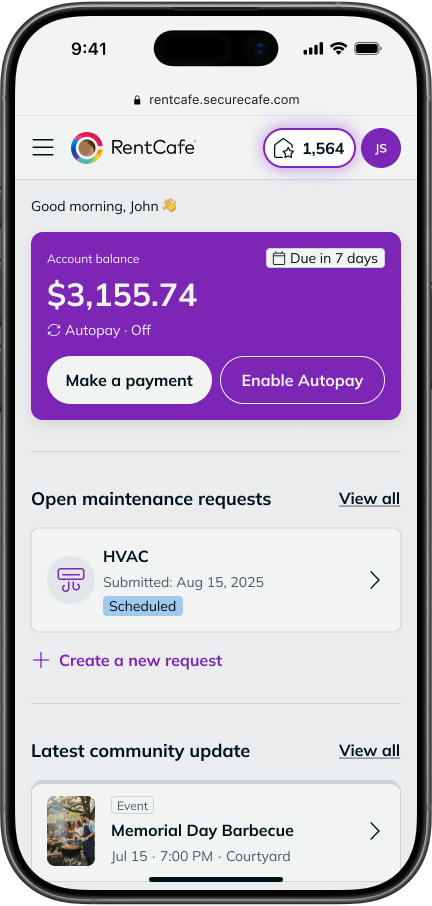
- From your “Home” screen: Your points are displayed at the top of the page. This is the quickest way to check your balance.
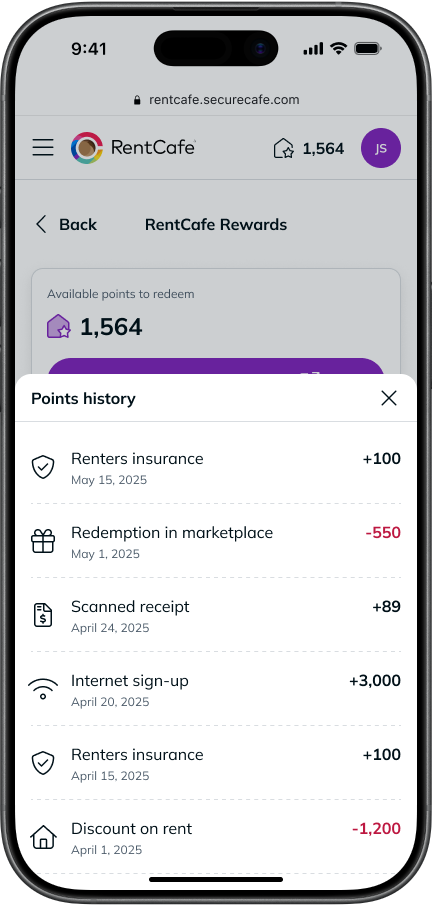
- From the RentCafe Rewards dashboard: Navigate to your dashboard for a detailed view of your full points history, including when each batch of points was added and which service earned them.
If your points haven’t appeared after the expected timeframe, give it a couple of extra business days for processing.
Earning opportunities and perks may expand over time, so keep an eye on our RentCafe Rewards page or your dashboard for the latest earning opportunities.
FAQ
Once you’ve joined RentCafe Rewards, points are earned automatically when you sign up for eligible services.
Yes, you can earn points from multiple qualifying services at once. For example, you could be earning points for renters insurance, rent payment reporting and RentCafe Internet, all at the same time. Each source adds points on its own schedule.
If you cancel a service before meeting the required active period (for example, canceling renters insurance within the first 30 days), you won’t receive the points for that service. Points are only awarded once you’ve met the requirements.
For renters insurance specifically, if your policy lapses at any point, you won’t earn points during that time — but you can start earning again once the policy is active.
If you cancel your RentCafe Rewards membership, any unused points will be lost. Before canceling, you may want to redeem any available points so they don’t go to waste.
First, double-check that you signed up for RentCafe Rewards and that your service is still active. If everything looks good and it’s been several extra business days beyond the expected timeframe, contact our support team or the service provider for help.