
How to add or remove roommates on RentCafe
Summary
You can add or remove roommates on your RentCafe application any time before you submit it. After you submit, roommate changes go through your property management.
Living situations change, and when they do, it’s important to keep your rental application up to date. Here’s everything you need to know about managing roommates on RentCafe.
Adding a roommate during the application process
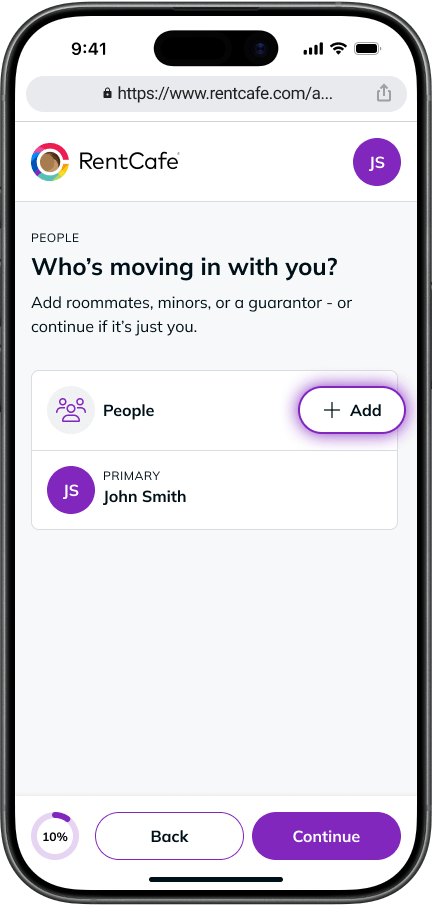
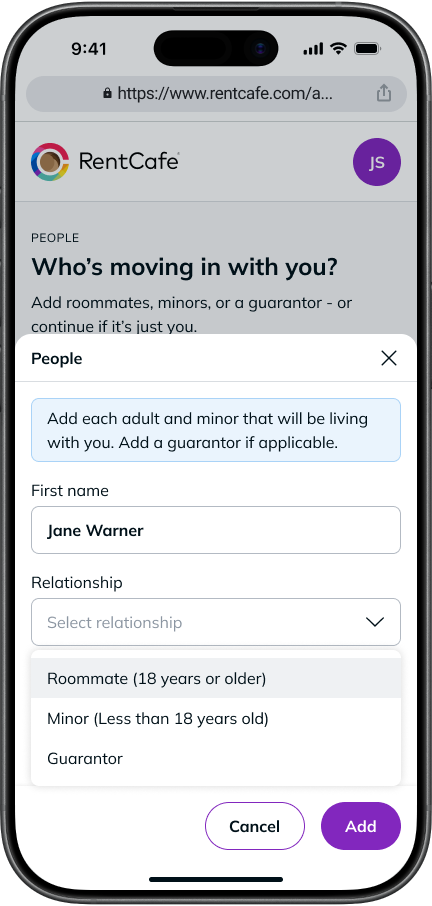
Once you’ve started completing your part of the application, you can invite a roommate to apply alongside you. Here’s how:
- In the “People” section of your application, click “Add”.
- Fill in the following details for your roommate:
- Full name
- Relationship — select between Minor (a dependent under 18), Roommate (someone who’ll live with you), or Guarantor (someone financially responsible for the home who won’t live there)
- Email address
- Click “Add”. Your roommate will receive an email with a link to complete their own part of the application.
Once they receive the invite, they’ll go through the same application process as you.
Removing a roommate during the application process
Before submitting your application, you can remove a roommate at any time. Here’s how:
- In the “People” section of your application, find the roommate you’d like to remove.
- Open the dropdown menu next to their name.
- Select “Delete applicant”.
How to add or remove a roommate when you already rent
After the application step, roommate changes can no longer be made directly through RentCafe. Instead, you must contact your property manager directly to request the removal.
Ready to find your next happy home? Start your search on RentCafe.com today.
FAQ
A: If your roommate hasn’t received the invite email, start by asking them to check their spam or junk folder, as the message can sometimes end up there. If they still can’t find it, you can resend the invitation through RentCafe to trigger a new email.
A: Yes. You can add multiple co-applicants in the “People” section by repeating the same steps for each person.
A: Your roommate will receive an email with a link to complete their portion of the application. Their application will be linked to yours throughout the process.
A: Choose Roommate for anyone living with you as a co-resident, Minor for any dependents under 18, and Guarantor for anyone who will be financially responsible for the home but not living there.
A: Yes, if you need to remove a roommate, you can do so through RentCafe at any time before submitting your application.