
How to find apartment deals using the Rent Specials filter on RentCafe
Summary
RentCafe‘s Rent specials filter lets you quickly narrow your search to apartments that currently offer discounts — things like one or two months free, reduced rent rates, application discounts or waived fees. Here’s how to use it.
What are Rent specials?
Rent specials are promotional offers set by the property, such as one-month free, reduced deposits, or waived application fees.
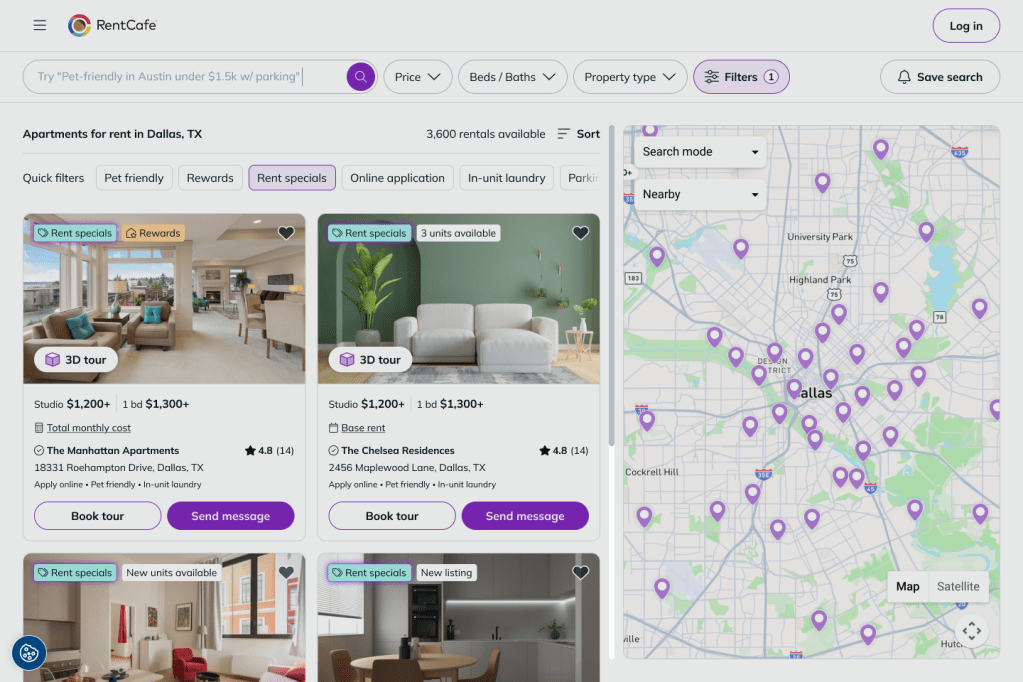
How to use the Rent specials filter
Start your search on RentCafe.com the way you normally would — enter your city, neighborhood, or zip code. Once your results load, you can browse through them and check the “Rent specials” label on individual listings to see which ones have active offers.
If you’d like to see only listings with rent specials, head to the filter options and select “Rent specials”. Your results will narrow down to only the apartments currently offering deals in your area.
How do I view Rent specials details on a listing?
Tap a property, then scroll to the Rent specials section — the offer details are shown automatically. Tap “Check details” to see the full terms and reach the property.
Open a listing, then check the “Rent specials” section below the photos.
The full offer details will appear, along with a contact form to reach the property, schedule a tour, or start an application.
Rent specials are set by the property and may apply only to specific floor plans or lease terms. Some are limited-time offers. Always check the “Rent specials” section on the property page for the full terms.