
What is the RentCafe move-in checklist and how does it work?
Summary
The RentCafe move-in checklist is integrated into your RentCafe account once your rental application is approved. It walks you through what you need to do before move-in, such as pending lease to-dos or setting up services you need as a renter.
The RentCafe move-in checklist is a personalized list of tasks designed to help you prepare for your new apartment. It keeps everything organized in one place so you can complete important steps like adding pets to your lease, uploading required documents, setting up utilities, choosing renters insurance and joining the RentCafe Rewards program.
How does the move-in checklist work?
Once the property approves your online lease application, the move-in checklist appears in your RentCafe account. At this stage, your account serves as your applicant portal, the place where you manage everything related to your application and upcoming move. The checklist outlines all the tasks you need to complete before your move-in date.
The specific items on your checklist may vary depending on your property and lease requirements.
Lease to-dos
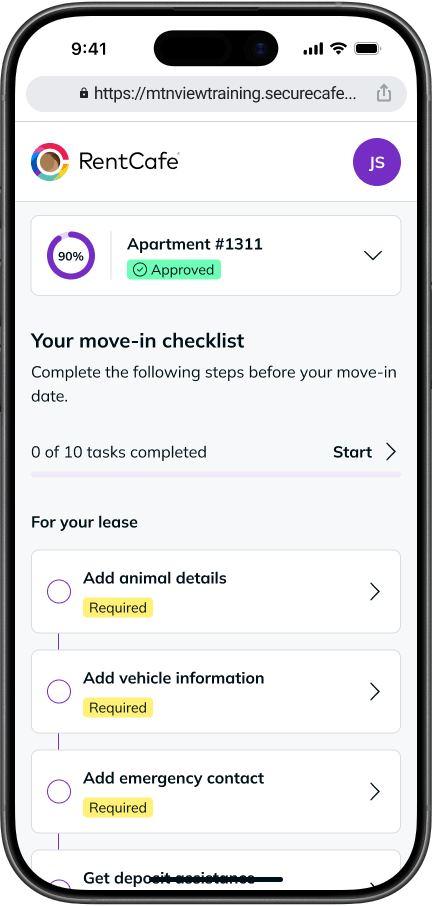
Your checklist may include remaining steps from your application, such as signing addenda, adding pet or vehicle information, adding your emergency contact and more. Your property determines which tasks are required.
You’ll find these steps in the “For your lease” section of your checklist.
Essential services
The move-in checklist also lets you set up RentCafe Renter Essentials, a suite of services designed to help you get settled.
Services may include renters insurance, electricity, internet and more from select providers.
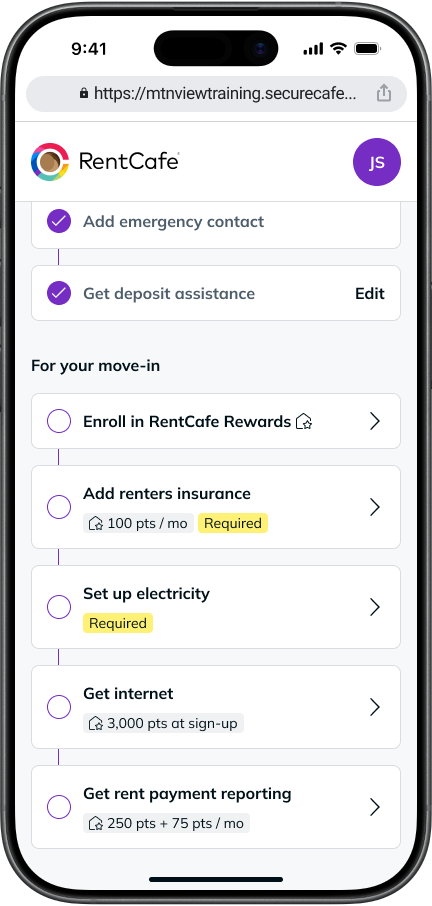
The services available to you depend on what your property offers, so your checklist will show only what’s applicable to your apartment. Additional services may become available at your property over time.
RentCafe Rewards
You can also join the RentCafe Rewards loyalty program from your move-in checklist. As a member, you can earn points for everyday purchases and Renter Essentials like renters insurance, internet and more from select providers, access local discounts and sign up for rent payment reporting at no cost.
Learn more about how RentCafe Rewards works.
What changes after signing the lease?
Once you and your property sign the lease agreement, your applicant portal becomes your resident portal. It’s the same RentCafe account, just tailored to your new life as a resident.
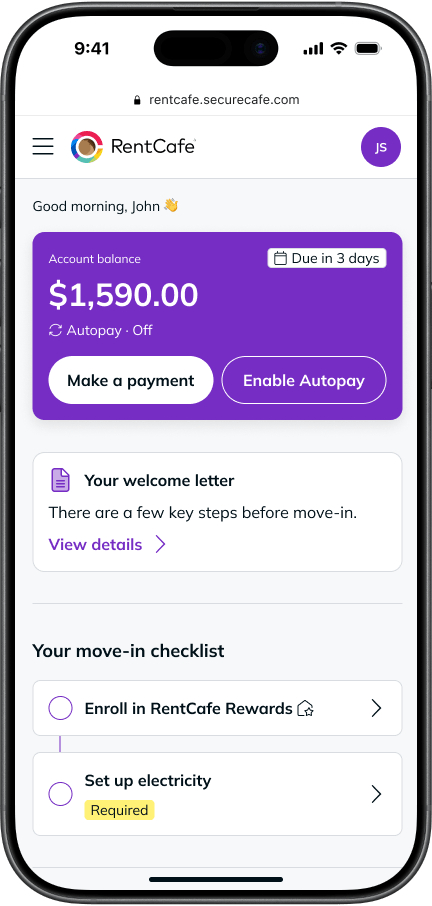
Any pending tasks on your move-in checklist stay available in your dashboard until move-in day. Services you’ve already set up carry over.
What happens to the checklist after I move in?
Your move-in checklist is available until your move-in date. After that, your account becomes your go-to hub for managing your apartment life. From there, you can:
- Manage your active services and sign up for new ones.
- Track rent and bill payments.
- Access your lease agreement and all related documents.
- Update your emergency contact, pet information, or vehicle details.
- Submit maintenance requests.
- View community updates.
- Handle lease renewals.
Log in to your RentCafe account to view your move-in checklist and get ready for your new home.
Still looking for your happy place? Search apartments on RentCafe.com.
FAQ
Not necessarily. Some tasks, like adding pet information, adding your emergency contact or providing proof of renters insurance, may be required by your lease. Others, like joining RentCafe Rewards, are optional but come with additional benefits. Your checklist indicates which items are required and which are optional.
While the feature is typically available at every RentCafe partner property, lease items and eligible services may vary based on the property and applicant. The move-in checklist will show only the lease items and services available for you to set up through RentCafe at your property.
Yes. You can continue setting up eligible Renter Essentials and manage any active services after moving in. You can do so in the “Renter Essentials” section within your RentCafe account.
Renter Essentials are services available through the RentCafe account at select properties. They can include renters insurance, electricity, internet, alternative security deposits, rent payment reporting and more.
If your property offers Renter Essentials, you can set them up directly from the move-in checklist. Some of these services may also be eligible for RentCafe Rewards points. Availability depends on your property, so not every service will appear for every renter.