
How do I use an offer through RentCafe Rewards?
Summary
In-store offers come in two types: mobile offers you redeem right from your phone, and printable offers you print as a voucher. Follow the instructions for your offer type, then present it to the merchant to get your discount.
Throughout RentCafe Rewards, you’ll find in-store offers in sections like “Just for You”, “Near You”, and “Local Dining Deals”. For most offers, you’ll be able to choose whether to redeem directly from your mobile device or print a voucher before visiting the participating merchant. Availability of each option can vary by merchant.
Each offer includes a set number of redemptions. Before you start, make sure you’re ready to use the offer, since choosing a redemption method uses one of your available redemptions.
When you’re ready to use your offer, open it and select “Redeem in-store”. You’ll see a pop-up asking how you’d like to redeem your offer.
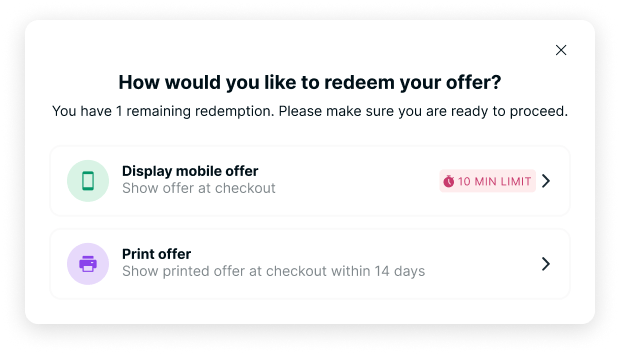
Follow the instructions below based on the type of offer you select.
How do I redeem a mobile offer?
Select the “Display mobile offer” option. You’ll have 10 minutes to redeem the offer. If you’re not ready, select the “X” in the upper-right corner to close the window. Present the offer on your mobile device to the participating merchant. After your discount has been applied, select “Done redeeming offer” to confirm your redemption.
Once you select “Done redeeming offer”, you’ll use up that offer’s available redemptions. Most offers can only be redeemed once.
Tip: Only open a mobile offer once you’re ready to pay. The countdown timer can’t be paused or restarted.
How do I redeem a printable offer?
Select the “Print offer” option. Printable offers are available for 14 days after you redeem them.
If you’re ready to continue, select “Print” to print your voucher. If you’re not ready, select the “X” in the upper-right corner to close the window and come back later.
Bring the printed voucher with you and present it to the participating merchant when making your purchase. After your discount has been applied, confirm your redemption to complete the process.