
How can I schedule a tour for an apartment on RentCafe?
Summary
You can tour apartments online or in person by visiting any property listing on RentCafe.com that has the “Schedule tour” (sometimes “Request tour”) button on the listing card. Choose between an in-person visit or a remote tour, pick a date and a time that works for you and submit your request. The property manager will confirm your appointment.
RentCafe makes scheduling a tour easy. You can schedule an apartment tour in just a few clicks from any RentCafe.com listing — whether you want to visit in person or visit remotely from wherever you are. Here’s exactly how to do it.
How do I schedule an apartment tour on RentCafe?
Scheduling a tour for an apartment on RentCafe only takes a few clicks. Follow these steps to request your tour:
Step 1: Find a property that offers tours
Start by searching for apartments on RentCafe.com. Use filters like location, price range, number of bedrooms, pet policy and amenities to narrow your results. Then, look for the “Schedule tour” (sometimes labeled “Request tour”) button on the listing card.
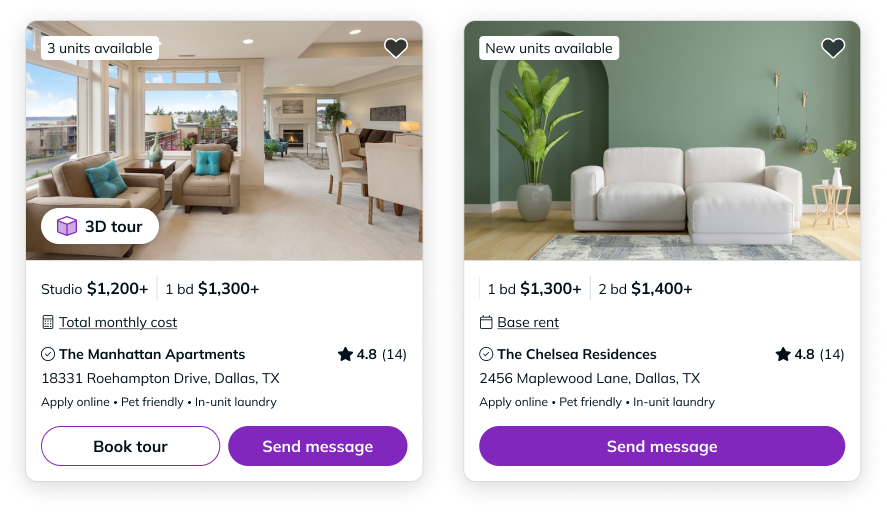
Many RentCafe properties offer tour scheduling, though availability varies by property. If a property doesn’t currently offer tours, you can still reach out through the contact form on the listing page.
Step 2: Choose your tour type
After clicking “Book tour” (or “Request tour”), you’ll see the available tour options for that property. Depending on what the property manager offers, you may be able to choose from:
- In-person tour: Walk through the apartment and community spaces on your own or with a member of the property team, depending on what the property offers. This is the best way to get a full feel for the layout, natural light and surrounding area.
- Remote tour: Visit the apartment remotely through a live video call or a pre-recorded walkthrough. This is a great option if you’re relocating from another city or want to narrow down your choices before visiting in person.
Not every property offers both options. The available tour types are set by the property manager and may vary by location.
Step 3: Select your preferred date and time
Once you’ve chosen a tour type, you’ll see a calendar with available dates and time slots. Select the option that works best for your schedule.
Weekday mornings tend to have more availability and give you a better sense of the community during a typical day. If you’re flexible, try booking earlier in the week.
Step 4: Enter your contact information and move-in date
You’ll be asked to provide a few basic details so the property team can reach you. This typically includes your name, email address, phone number and your expected move-in date.
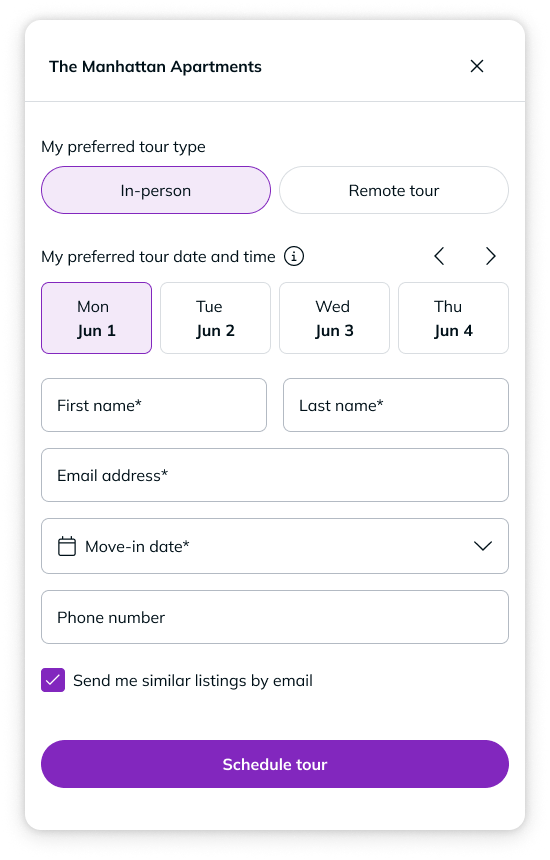
If you already have a RentCafe account, some of this information may be pre-filled for you. If you don’t have an account yet, you can still complete the form — no sign-up is required to request a tour.
Step 5: Submit your request and wait for confirmation
After reviewing your information, click “Schedule tour” (or “Request tour”) to send your request to the property manager. Once you submit your request, your tour is scheduled right away — you don’t need to wait for the property manager to confirm it. You’ll receive a confirmation email and a reminder email closer to your scheduled time.
In rare cases (e.g., a scheduling conflict), the property manager may reach out to adjust the time.
Ready to find your next home?
Once you’ve toured a few apartments, you’ll be ready to take the next step. Head to RentCafe.com to search for apartments in your area and schedule your first tour. When you find the right place, you can apply directly from the listing page.
FAQ
No. You can request an apartment tour on RentCafe without creating an account. However, if you plan to tour multiple properties or want to save your favorite listings, creating a free RentCafe account can save you time by keeping your contact details and search preferences in one place.
Yes. The RentCafe website is fully mobile-friendly and you can also browse listings and contact properties through the RentCafe app. The process works the same way — search for a property, tap “Schedule tour” (or “Request tour”), choose your options and submit your request.
If your plans change, use the Cancel or Reschedule link in your tour confirmation email — no need to call. If you can’t find the email or need a different time entirely, you can also contact the property directly using the phone number or email listed on their RentCafe page.
It depends on the property and where you’re looking. In high-demand areas, scheduling two to three days in advance is a good practice. In slower areas, same-day or next-day tours may be available.
No. Scheduling a tour is simply a visit request — it doesn’t commit you to anything. Applying for an apartment is a separate process and you can start it from the property’s listing page on RentCafe whenever you’re ready.