
How to tour apartments online on RentCafe
Summary
You can tour apartments online on RentCafe by opening any listing that features a 3D tour, video walkthrough or 360° view. Browse listings in your area, look for the “3D tour” label and launch the tour directly from the property page. Virtual tours are free, work on any device and don’t require an account .
Searching for apartments has never been easier, thanks to the ability to tour apartments online directly from RentCafe. Virtual touring tools let you explore apartments, view layouts and get a genuine feel for your future home — all from wherever you are.
In this step-by-step guide, you’ll learn how to find, launch and evaluate online apartment tours on RentCafe.com.
How can I take online tours of apartments on RentCafe?
Whether you’re moving to a new city or simply exploring options in your neighborhood, RentCafe’s online touring tools make it easy to explore apartments on your own terms.
Many listings on RentCafe.com feature 3D interactive tours, video walkthroughs and 360° views so you can get a real sense of the space.
Follow the steps below to find a listing with virtual tour options, choose your preferred tour format and evaluate the apartment with confidence.
Step 1: Find properties with virtual tour options
Start by browsing RentCafe listings in your desired area. Here’s how to find apartments with video tours depending on the device you’re using:
1. Look for labels like “Videos,” “Floorplan Videos” or “Floorplan Virtual Tours”
Any of these mean you can tour the apartment online before visiting in person.
2. Click on listings with those labels
You’ll be able to tour the property virtually.
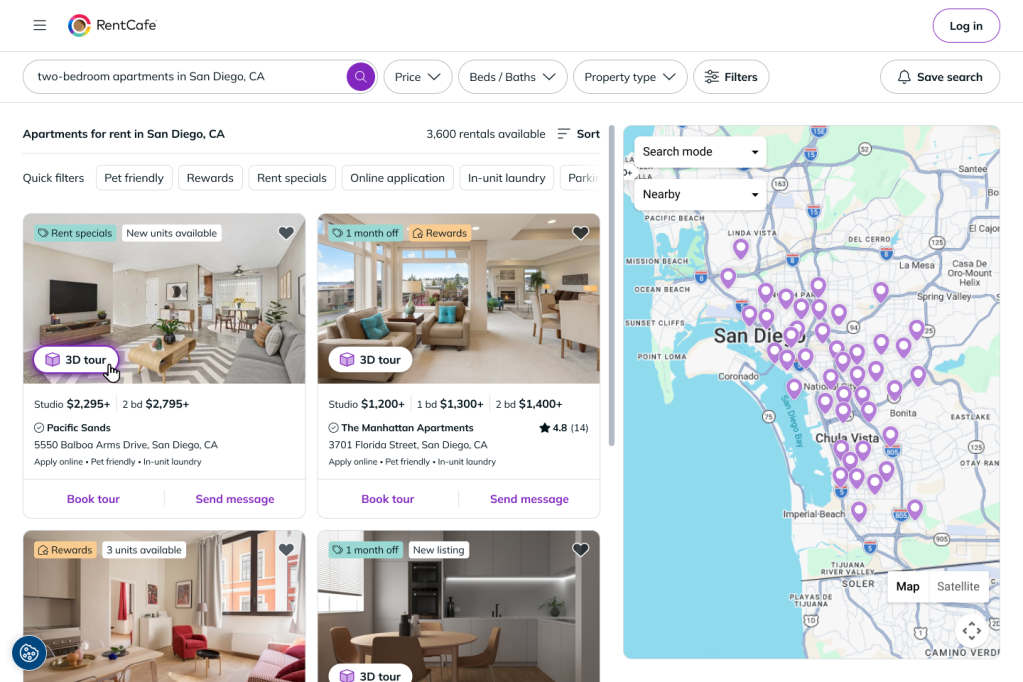
1. Look for the “3D tour” label
This tells you a property offers virtual viewing options.
2. Click on a listing with that label
You’ll be able to tour the property virtually.
Step 2: Choose your tour type
Some properties offer one or more types of online tours. Click on the available option to launch an online tour. Common formats include:
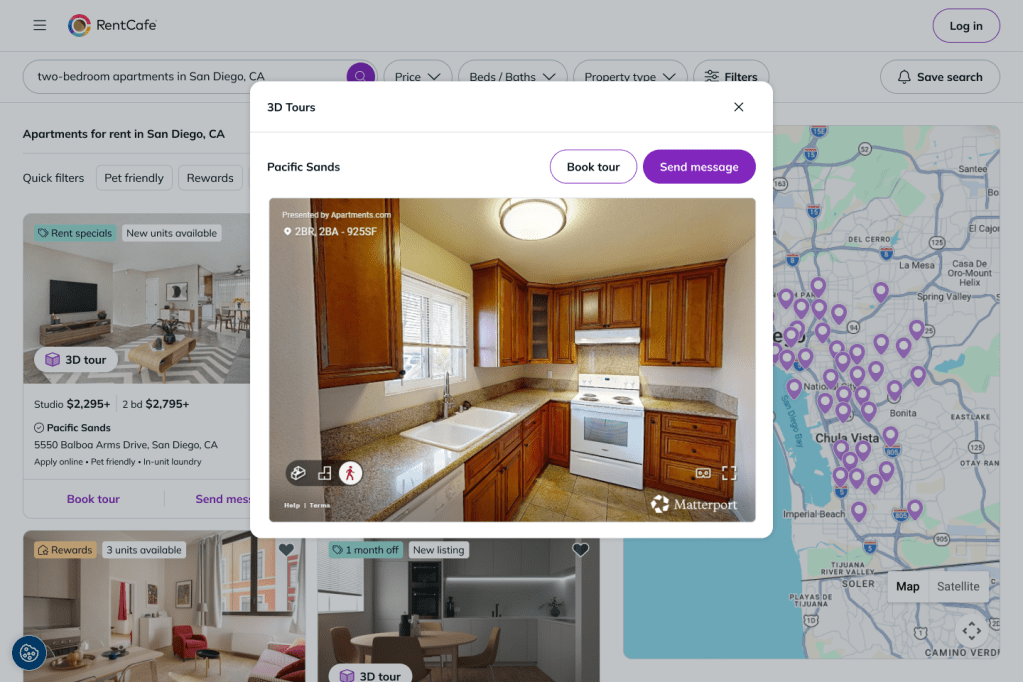
- 3D interactive tours: Walk through the apartment virtually, moving from room to room at your own pace.
- Video tours: Watch a guided walkthrough of the unit, often highlighting key features and finishes.
- 360° views: Explore panoramic images by rotating your view within each room.
Choose the format that best matches how you prefer to explore apartments online.
Step 3: Navigate the virtual experience
Once the tour loads, use your device to move through the apartment. Here’s how to do it depending on the device you’re using:
Swipe and tap
Swipe to look around and tap navigation points to move through each room.
Click and drag your mouse
Click and drag your mouse to look around each room, then use directional arrows or floor markers to move between rooms.
Take your time exploring each area, from the kitchen to the bedrooms to the living spaces. This is your chance to picture your daily life in this home.
Most tours load directly in your browser, so you don’t need to download anything. A stable internet connection ensures smooth rendering, especially for high-resolution 3D tours.
Step 4: Analyze layout and features
As you tour the unit, pay close attention to the details that matter most for daily living. Check out:
- Room sizes and overall layout flow
- Natural light and window placement
- Storage space, including closets and cabinets
- Appliances, countertops and finishes
These spatial details are often difficult to judge from static photos alone, which is why virtual tours can give you a significant advantage during your search.
Step 5: Use interactive elements
Some tours include inlcude clickable features that show more details about things like appliance brands, countertop materials, flooring types or included amenities. Look for features such as:
- Hotspots: These are clickable points that reveal more information about specific features or materials.
- Floor plan overlays: See exactly where you are within the unit’s layout as you move through rooms.
- Zoom controls: Get a closer look at details like countertop finishes, fixtures or flooring.
Taking advantage of these interactive elements gives you a much more realistic understanding of the space.
Step 6: Switch between views
Some virtual tours let you jump between rooms using navigation shortcuts such as a minimap or scene list. Use these shortcuts to:
- Revisit areas that stood out to you
- Skip directly to specific rooms, like the bedroom or kitchen
- View the unit from different angles
This way, you can compare rooms without restarting the tour.
Step 7: Compare multiple units
If the property offers multiple floor plans with online tours, repeat the process for each one. Touring more than one layout allows you to:
- Compare configurations for multiple apartments
- Identify which apartment best suits your space and budget preferences
- Understand how different floor plans feel in practice
Comparing units online saves significant time compared to scheduling multiple in-person tours.
Step 8: Save and revisit tours
You can revisit any virtual tour at any time by returning to the listing page. Watching the tour again helps you:
- Confirm your first impressions
- Catch details you may have missed initially
- Make a more confident decision
Bookmarking your favorite listings ensures you can easily come back to them later.
Step 9: Contact properties
Once you’ve narrowed your choices, you can reach out to the property directly through RentCafe. Most listings include options to:
- Send a message or inquiry through the listing page
- Schedule an in-person tour if you’d like to see the apartment firsthand
- Request additional details about pricing, availability or lease terms
Getting in touch with the property manager early can help you secure a home before it’s taken.
Step 10: Prepare for next steps
After touring apartments online and selecting your top picks, you’ll be ready to move forward with the rental process. Be prepared to:
- Submit a rental application through RentCafe
- Provide necessary documentation such as a valid ID and proof of income
- Review lease terms carefully before signing
Some properties let you to complete the entire application and move-in process online through RentCafe.
Tips for effective online apartment tours on RentCafe:
- Use a larger screen — a laptop or tablet offers better visibility than a phone.
- Ensure a stable internet connection for smooth, uninterrupted navigation.
- Turn up the sound for video tours that include narration or ambient audio.
- Minimize distractions so you can focus on the details that matter.
- Take notes or screenshots of features you want to remember or compare later.
Touring apartments online on RentCafe is a convenient and efficient way to explore potential homes without visiting each one in person. By following these steps, you can confidently navigate listings, evaluate listings and move closer to finding the perfect apartment — entirely online.
FAQ
Yes, all virtual tours available on RentCafe property listings are completely free to access and you don’t need an account to view them.
While online tours provide a thorough view of a unit, an in-person tour can help you assess things like neighborhood feel, noise levels and building common areas that online tours may not cover.
Absolutely. RentCafe’s virtual tours are mobile-friendly, so you can swipe and tap to navigate tours directly on your smartphone or tablet.
Not all listings include virtual tours. On your phone, look for labels like “Videos,” “Floorplan Videos” or “Floorplan Virtual Tours” on the listing card to identify properties that offer this option. If you’re searching from a desktop computer, look for “3D tour.”
Yes. Many RentCafe listings include an “Apply now” option on the property page, allowing you to start your application immediately after touring online.